Getting started
Send SMS to Safaricom, Airtel, Telkom and other Kenyan networks from your own application with one HTTPS request. Bulk SMS costs KES 0.35 per SMS on all networks, with no set-up or monthly fees.
https://textapi.mobitechtechnologies.comJSON (UTF-8)h_api_key header- Create a Bulk SMS account (new accounts get 500 free SMS) and have your Sender ID approved, or use the default one assigned to you.
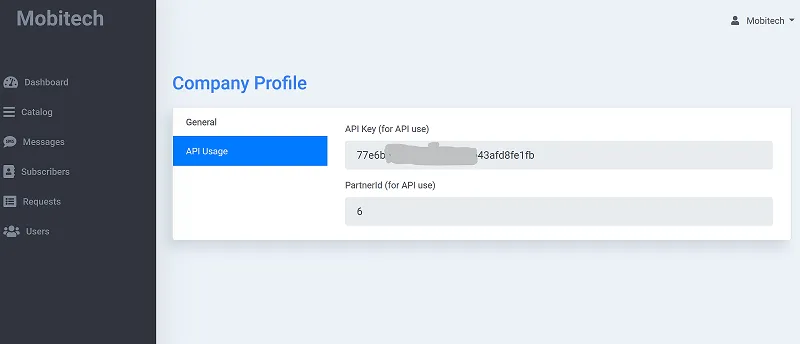
- Log in to the Bulk SMS portal and copy your API key from your company profile.
- Send your first SMS with the request below.
curl -X POST "https://textapi.mobitechtechnologies.com/sms/sendsms" \
  -H "h_api_key: YOUR_API_KEY" \
  -H "Content-Type: application/json" \
  -d '{
  "mobile": "254712345678",
  "message": "Hello from Mobitech!",
  "sender_name": "MOBITECH",
  "service_id": 0
}'<?php
$ch = curl_init('https://textapi.mobitechtechnologies.com/sms/sendsms');
curl_setopt_array($ch, [
CURLOPT_RETURNTRANSFER => true,
CURLOPT_POST => true,
CURLOPT_HTTPHEADER => [
'h_api_key: YOUR_API_KEY',
'Content-Type: application/json',
],
CURLOPT_POSTFIELDS => json_encode([
'mobile' => '254712345678',
'message' => 'Hello from Mobitech!',
'sender_name' => 'MOBITECH',
'service_id' => 0
]),
]);
$response = curl_exec($ch);
curl_close($ch);
$result = json_decode($response, true);
print_r($result);import requests
response = requests.post(
"https://textapi.mobitechtechnologies.com/sms/sendsms",
headers={
"h_api_key": "YOUR_API_KEY"
},
json={
"mobile": "254712345678",
"message": "Hello from Mobitech!",
"sender_name": "MOBITECH",
"service_id": 0
},
)
print(response.json())// Node.js 18+ (built-in fetch)
const response = await fetch("https://textapi.mobitechtechnologies.com/sms/sendsms", {
method: "POST",
headers: {
h_api_key: "YOUR_API_KEY",
"Content-Type": "application/json"
},
body: JSON.stringify({
mobile: "254712345678",
message: "Hello from Mobitech!",
sender_name: "MOBITECH",
service_id: 0
}),
});
const data = await response.json();
console.log(data);// Java 17+
import java.net.URI;
import java.net.http.HttpClient;
import java.net.http.HttpRequest;
import java.net.http.HttpResponse;
public class Main {
public static void main(String[] args) throws Exception {
String body = """
{
"mobile": "254712345678",
"message": "Hello from Mobitech!",
"sender_name": "MOBITECH",
"service_id": 0
}
""";
HttpRequest request = HttpRequest.newBuilder(URI.create("https://textapi.mobitechtechnologies.com/sms/sendsms"))
.header("h_api_key", "YOUR_API_KEY")
.header("Content-Type", "application/json")
.POST(HttpRequest.BodyPublishers.ofString(body))
.build();
HttpResponse<String> response = HttpClient.newHttpClient()
.send(request, HttpResponse.BodyHandlers.ofString());
System.out.println(response.body());
}
}// .NET 6+
using System.Net.Http;
using System.Text;
var client = new HttpClient();
var request = new HttpRequestMessage(HttpMethod.Post, "https://textapi.mobitechtechnologies.com/sms/sendsms");
request.Headers.TryAddWithoutValidation("h_api_key", "YOUR_API_KEY");
request.Content = new StringContent(@"{
""mobile"": ""254712345678"",
""message"": ""Hello from Mobitech!"",
""sender_name"": ""MOBITECH"",
""service_id"": 0
}", Encoding.UTF8, "application/json");
var response = await client.SendAsync(request);
Console.WriteLine(await response.Content.ReadAsStringAsync());Authentication
Every request carries your API key in the h_api_key header. If your HTTP client can't send custom headers,
put it in the JSON body as "h_api_key" instead.
h_api_key: YOUR_API_KEYFind the key in the Bulk SMS portal under your company profile:
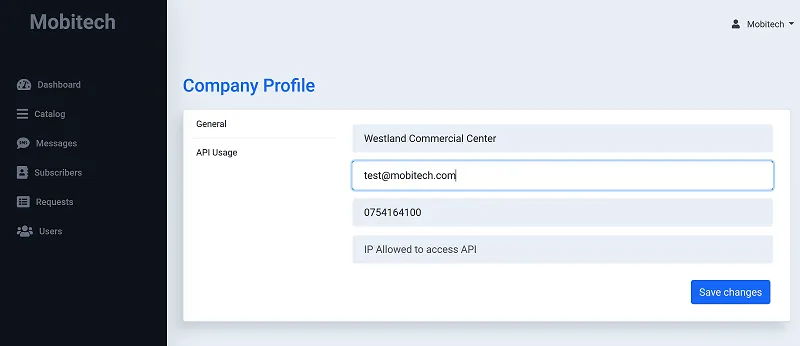
Lock the key to your servers. In the same profile you can whitelist the IP addresses your requests come from
(separate several with commas). Requests from other addresses are refused with code 1014.
Send an SMS
https://textapi.mobitechtechnologies.com/sms/sendsms Sends one message to one phone number. The response tells you the cost and your remaining credit straight away.
Body
-
mobilestring required - Recipient in international format, e.g.
254712345678. -
messagestring required - The text. Every 160 characters is charged as one SMS.
-
sender_namestring required - Your approved Sender ID (or shortcode), e.g.
MOBITECH. -
service_idinteger optional 0for bulk SMS (default).-
response_typestring optional json(default) orplain.
curl -X POST "https://textapi.mobitechtechnologies.com/sms/sendsms" \
  -H "h_api_key: YOUR_API_KEY" \
  -H "Content-Type: application/json" \
  -d '{
  "mobile": "254712345678",
  "message": "Hi Jane, your order #1024 has been dispatched.",
  "sender_name": "MOBITECH",
  "service_id": 0,
  "response_type": "json"
}'<?php
$ch = curl_init('https://textapi.mobitechtechnologies.com/sms/sendsms');
curl_setopt_array($ch, [
CURLOPT_RETURNTRANSFER => true,
CURLOPT_POST => true,
CURLOPT_HTTPHEADER => [
'h_api_key: YOUR_API_KEY',
'Content-Type: application/json',
],
CURLOPT_POSTFIELDS => json_encode([
'mobile' => '254712345678',
'message' => 'Hi Jane, your order #1024 has been dispatched.',
'sender_name' => 'MOBITECH',
'service_id' => 0,
'response_type' => 'json'
]),
]);
$response = curl_exec($ch);
curl_close($ch);
$result = json_decode($response, true);
print_r($result);import requests
response = requests.post(
"https://textapi.mobitechtechnologies.com/sms/sendsms",
headers={
"h_api_key": "YOUR_API_KEY"
},
json={
"mobile": "254712345678",
"message": "Hi Jane, your order #1024 has been dispatched.",
"sender_name": "MOBITECH",
"service_id": 0,
"response_type": "json"
},
)
print(response.json())// Node.js 18+ (built-in fetch)
const response = await fetch("https://textapi.mobitechtechnologies.com/sms/sendsms", {
method: "POST",
headers: {
h_api_key: "YOUR_API_KEY",
"Content-Type": "application/json"
},
body: JSON.stringify({
mobile: "254712345678",
message: "Hi Jane, your order #1024 has been dispatched.",
sender_name: "MOBITECH",
service_id: 0,
response_type: "json"
}),
});
const data = await response.json();
console.log(data);// Java 17+
import java.net.URI;
import java.net.http.HttpClient;
import java.net.http.HttpRequest;
import java.net.http.HttpResponse;
public class Main {
public static void main(String[] args) throws Exception {
String body = """
{
"mobile": "254712345678",
"message": "Hi Jane, your order #1024 has been dispatched.",
"sender_name": "MOBITECH",
"service_id": 0,
"response_type": "json"
}
""";
HttpRequest request = HttpRequest.newBuilder(URI.create("https://textapi.mobitechtechnologies.com/sms/sendsms"))
.header("h_api_key", "YOUR_API_KEY")
.header("Content-Type", "application/json")
.POST(HttpRequest.BodyPublishers.ofString(body))
.build();
HttpResponse<String> response = HttpClient.newHttpClient()
.send(request, HttpResponse.BodyHandlers.ofString());
System.out.println(response.body());
}
}// .NET 6+
using System.Net.Http;
using System.Text;
var client = new HttpClient();
var request = new HttpRequestMessage(HttpMethod.Post, "https://textapi.mobitechtechnologies.com/sms/sendsms");
request.Headers.TryAddWithoutValidation("h_api_key", "YOUR_API_KEY");
request.Content = new StringContent(@"{
""mobile"": ""254712345678"",
""message"": ""Hi Jane, your order #1024 has been dispatched."",
""sender_name"": ""MOBITECH"",
""service_id"": 0,
""response_type"": ""json""
}", Encoding.UTF8, "application/json");
var response = await client.SendAsync(request);
Console.WriteLine(await response.Content.ReadAsStringAsync());{
"status_code": "1000",
"status_desc": "Success",
"message_id": "28451977",
"mobile_number": "254712345678",
"network_id": "1",
"message_cost": "0.35",
"credit_balance": "1499.65"
}
Keep message_id: it's what you use to fetch the delivery report. With
"response_type": "plain" the response is status_code;status_desc;message_id, e.g.
1000;Success;28451977.
Send in bulk
https://textapi.mobitechtechnologies.com/sms/sendmultiple
Sends many messages in one request: each recipient can get a different text, and you can tag each one with your own
client_ref to match results back to your records. Credit is checked once for the whole batch.
Body
-
sender_namestring required - Your approved Sender ID.
-
messagesarray required - One object per recipient:
mobile,messageand an optionalclient_ref. -
date_sendstring optional - Send later:
YYYY-MM-DD HH:MM:SS, East Africa Time. See Schedule messages. -
service_idinteger optional 0for bulk SMS (default).
curl -X POST "https://textapi.mobitechtechnologies.com/sms/sendmultiple" \
  -H "h_api_key: YOUR_API_KEY" \
  -H "Content-Type: application/json" \
  -d '{
  "sender_name": "MOBITECH",
  "service_id": 0,
  "messages": [
    {
      "mobile": "254712345678",
      "message": "Hi Jane, your balance is KES 1,200.",
      "client_ref": "cust-1001"
    },
    {
      "mobile": "254733000111",
      "message": "Hi Otieno, your balance is KES 450.",
      "client_ref": "cust-1002"
    }
  ]
}'<?php
$ch = curl_init('https://textapi.mobitechtechnologies.com/sms/sendmultiple');
curl_setopt_array($ch, [
CURLOPT_RETURNTRANSFER => true,
CURLOPT_POST => true,
CURLOPT_HTTPHEADER => [
'h_api_key: YOUR_API_KEY',
'Content-Type: application/json',
],
CURLOPT_POSTFIELDS => json_encode([
'sender_name' => 'MOBITECH',
'service_id' => 0,
'messages' => [
[
'mobile' => '254712345678',
'message' => 'Hi Jane, your balance is KES 1,200.',
'client_ref' => 'cust-1001'
],
[
'mobile' => '254733000111',
'message' => 'Hi Otieno, your balance is KES 450.',
'client_ref' => 'cust-1002'
]
]
]),
]);
$response = curl_exec($ch);
curl_close($ch);
$result = json_decode($response, true);
print_r($result);import requests
response = requests.post(
"https://textapi.mobitechtechnologies.com/sms/sendmultiple",
headers={
"h_api_key": "YOUR_API_KEY"
},
json={
"sender_name": "MOBITECH",
"service_id": 0,
"messages": [
{
"mobile": "254712345678",
"message": "Hi Jane, your balance is KES 1,200.",
"client_ref": "cust-1001"
},
{
"mobile": "254733000111",
"message": "Hi Otieno, your balance is KES 450.",
"client_ref": "cust-1002"
}
]
},
)
print(response.json())// Node.js 18+ (built-in fetch)
const response = await fetch("https://textapi.mobitechtechnologies.com/sms/sendmultiple", {
method: "POST",
headers: {
h_api_key: "YOUR_API_KEY",
"Content-Type": "application/json"
},
body: JSON.stringify({
sender_name: "MOBITECH",
service_id: 0,
messages: [
{
mobile: "254712345678",
message: "Hi Jane, your balance is KES 1,200.",
client_ref: "cust-1001"
},
{
mobile: "254733000111",
message: "Hi Otieno, your balance is KES 450.",
client_ref: "cust-1002"
}
]
}),
});
const data = await response.json();
console.log(data);// Java 17+
import java.net.URI;
import java.net.http.HttpClient;
import java.net.http.HttpRequest;
import java.net.http.HttpResponse;
public class Main {
public static void main(String[] args) throws Exception {
String body = """
{
"sender_name": "MOBITECH",
"service_id": 0,
"messages": [
{
"mobile": "254712345678",
"message": "Hi Jane, your balance is KES 1,200.",
"client_ref": "cust-1001"
},
{
"mobile": "254733000111",
"message": "Hi Otieno, your balance is KES 450.",
"client_ref": "cust-1002"
}
]
}
""";
HttpRequest request = HttpRequest.newBuilder(URI.create("https://textapi.mobitechtechnologies.com/sms/sendmultiple"))
.header("h_api_key", "YOUR_API_KEY")
.header("Content-Type", "application/json")
.POST(HttpRequest.BodyPublishers.ofString(body))
.build();
HttpResponse<String> response = HttpClient.newHttpClient()
.send(request, HttpResponse.BodyHandlers.ofString());
System.out.println(response.body());
}
}// .NET 6+
using System.Net.Http;
using System.Text;
var client = new HttpClient();
var request = new HttpRequestMessage(HttpMethod.Post, "https://textapi.mobitechtechnologies.com/sms/sendmultiple");
request.Headers.TryAddWithoutValidation("h_api_key", "YOUR_API_KEY");
request.Content = new StringContent(@"{
""sender_name"": ""MOBITECH"",
""service_id"": 0,
""messages"": [
{
""mobile"": ""254712345678"",
""message"": ""Hi Jane, your balance is KES 1,200."",
""client_ref"": ""cust-1001""
},
{
""mobile"": ""254733000111"",
""message"": ""Hi Otieno, your balance is KES 450."",
""client_ref"": ""cust-1002""
}
]
}", Encoding.UTF8, "application/json");
var response = await client.SendAsync(request);
Console.WriteLine(await response.Content.ReadAsStringAsync());{
"status_code": 1000,
"status_desc": "Success",
"credit_balance": "1499.30",
"schedule_details": [
{
"message_id": "28451978",
"client_ref": "cust-1001",
"mobile": "254712345678",
"schedule_status": "1",
"schedule_desc": "Success",
"network_id": "1",
"message_cost": "0.35"
},
{
"message_id": "0",
"client_ref": "cust-1002",
"mobile": "254733000111",
"schedule_status": "0",
"schedule_desc": "Mobile number 254733000111 in DND.",
"network_id": "2",
"message_cost": "0"
}
]
}
Each entry in schedule_details has schedule_status 1 (accepted) or 0
(not sent, with the reason in schedule_desc). You're only charged for accepted messages.
Schedule messages
Add date_send to a /sms/sendmultiple request to send at a later time. Use East Africa Time
(UTC+3) in the format YYYY-MM-DD HH:MM:SS; a time in the past is rejected with 1009.
curl -X POST "https://textapi.mobitechtechnologies.com/sms/sendmultiple" \
  -H "h_api_key: YOUR_API_KEY" \
  -H "Content-Type: application/json" \
  -d '{
  "sender_name": "MOBITECH",
  "date_send": "2026-12-24 08:00:00",
  "messages": [
    {
      "mobile": "254712345678",
      "message": "Merry Christmas from all of us at Mobitech!",
      "client_ref": "xmas-1"
    }
  ]
}'<?php
$ch = curl_init('https://textapi.mobitechtechnologies.com/sms/sendmultiple');
curl_setopt_array($ch, [
CURLOPT_RETURNTRANSFER => true,
CURLOPT_POST => true,
CURLOPT_HTTPHEADER => [
'h_api_key: YOUR_API_KEY',
'Content-Type: application/json',
],
CURLOPT_POSTFIELDS => json_encode([
'sender_name' => 'MOBITECH',
'date_send' => '2026-12-24 08:00:00',
'messages' => [
[
'mobile' => '254712345678',
'message' => 'Merry Christmas from all of us at Mobitech!',
'client_ref' => 'xmas-1'
]
]
]),
]);
$response = curl_exec($ch);
curl_close($ch);
$result = json_decode($response, true);
print_r($result);import requests
response = requests.post(
"https://textapi.mobitechtechnologies.com/sms/sendmultiple",
headers={
"h_api_key": "YOUR_API_KEY"
},
json={
"sender_name": "MOBITECH",
"date_send": "2026-12-24 08:00:00",
"messages": [
{
"mobile": "254712345678",
"message": "Merry Christmas from all of us at Mobitech!",
"client_ref": "xmas-1"
}
]
},
)
print(response.json())// Node.js 18+ (built-in fetch)
const response = await fetch("https://textapi.mobitechtechnologies.com/sms/sendmultiple", {
method: "POST",
headers: {
h_api_key: "YOUR_API_KEY",
"Content-Type": "application/json"
},
body: JSON.stringify({
sender_name: "MOBITECH",
date_send: "2026-12-24 08:00:00",
messages: [
{
mobile: "254712345678",
message: "Merry Christmas from all of us at Mobitech!",
client_ref: "xmas-1"
}
]
}),
});
const data = await response.json();
console.log(data);// Java 17+
import java.net.URI;
import java.net.http.HttpClient;
import java.net.http.HttpRequest;
import java.net.http.HttpResponse;
public class Main {
public static void main(String[] args) throws Exception {
String body = """
{
"sender_name": "MOBITECH",
"date_send": "2026-12-24 08:00:00",
"messages": [
{
"mobile": "254712345678",
"message": "Merry Christmas from all of us at Mobitech!",
"client_ref": "xmas-1"
}
]
}
""";
HttpRequest request = HttpRequest.newBuilder(URI.create("https://textapi.mobitechtechnologies.com/sms/sendmultiple"))
.header("h_api_key", "YOUR_API_KEY")
.header("Content-Type", "application/json")
.POST(HttpRequest.BodyPublishers.ofString(body))
.build();
HttpResponse<String> response = HttpClient.newHttpClient()
.send(request, HttpResponse.BodyHandlers.ofString());
System.out.println(response.body());
}
}// .NET 6+
using System.Net.Http;
using System.Text;
var client = new HttpClient();
var request = new HttpRequestMessage(HttpMethod.Post, "https://textapi.mobitechtechnologies.com/sms/sendmultiple");
request.Headers.TryAddWithoutValidation("h_api_key", "YOUR_API_KEY");
request.Content = new StringContent(@"{
""sender_name"": ""MOBITECH"",
""date_send"": ""2026-12-24 08:00:00"",
""messages"": [
{
""mobile"": ""254712345678"",
""message"": ""Merry Christmas from all of us at Mobitech!"",
""client_ref"": ""xmas-1""
}
]
}", Encoding.UTF8, "application/json");
var response = await client.SendAsync(request);
Console.WriteLine(await response.Content.ReadAsStringAsync());Delivery reports
https://textapi.mobitechtechnologies.com/sms/getdlr?message_id={id}
Returns the delivery status of one message, using the message_id from the send response. Send your key in the
api_key header for this endpoint.
curl "https://textapi.mobitechtechnologies.com/sms/getdlr?message_id=28451977" \
-H "api_key: YOUR_API_KEY"<?php
$ch = curl_init('https://textapi.mobitechtechnologies.com/sms/getdlr?message_id=28451977');
curl_setopt_array($ch, [
CURLOPT_RETURNTRANSFER => true,
CURLOPT_HTTPHEADER => [
'api_key: YOUR_API_KEY',
],
]);
$response = curl_exec($ch);
curl_close($ch);
$result = json_decode($response, true);
print_r($result);import requests
response = requests.get(
"https://textapi.mobitechtechnologies.com/sms/getdlr",
params={
"message_id": "28451977"
},
headers={
"api_key": "YOUR_API_KEY"
},
)
print(response.json())// Node.js 18+ (built-in fetch)
const response = await fetch("https://textapi.mobitechtechnologies.com/sms/getdlr?message_id=28451977", {
headers: {
api_key: "YOUR_API_KEY"
},
});
const data = await response.json();
console.log(data);// Java 17+
import java.net.URI;
import java.net.http.HttpClient;
import java.net.http.HttpRequest;
import java.net.http.HttpResponse;
public class Main {
public static void main(String[] args) throws Exception {
HttpRequest request = HttpRequest.newBuilder(URI.create("https://textapi.mobitechtechnologies.com/sms/getdlr?message_id=28451977"))
.header("api_key", "YOUR_API_KEY")
.GET()
.build();
HttpResponse<String> response = HttpClient.newHttpClient()
.send(request, HttpResponse.BodyHandlers.ofString());
System.out.println(response.body());
}
}// .NET 6+
using System.Net.Http;
using System.Text;
var client = new HttpClient();
var request = new HttpRequestMessage(HttpMethod.Get, "https://textapi.mobitechtechnologies.com/sms/getdlr?message_id=28451977");
request.Headers.TryAddWithoutValidation("api_key", "YOUR_API_KEY");
var response = await client.SendAsync(request);
Console.WriteLine(await response.Content.ReadAsStringAsync());{
"status": "ok",
"status_message": "record found",
"data": {
"message_id": "28451977",
"mobile": "254712345678",
"dlr_status": "1",
"dlr_desc": "DeliveredToTerminal",
"dlr_time": "2026-11-18 10:15:07",
"tat": "4",
"network_id": "1",
"sms_cost": "0.35"
}
} dlr_status is one of the delivery statuses; tat is the time to deliver
in seconds. Unknown ids return {"status": "failed", "status_message": "record not found"}.
Response codes
Every send response includes status_code and status_desc. Only 1000 means the message was accepted.
| Code | Meaning |
|---|---|
1000 | Success: message accepted for processing |
1001 | Invalid sender name (shortcode / Sender ID) |
1002 | Network not allowed |
1003 | Invalid mobile number |
1004 | Low bulk credits: top up your account |
1005 | Internal system error: retry later |
1006 | Invalid credentials (API key missing or wrong) |
1009 | Data type not supported: send a JSON body |
1010 | Request type not supported |
1011 | Invalid user state or account suspended |
1012 | Mobile number in DND (do-not-disturb) list |
1013 | Invalid API key |
1014 | IP not allowed: add it to your whitelist |
1015 | Missing parameter |
1016 | Monthly credit limit reached |
Delivery statuses
The most common values of dlr_status in delivery reports:
| dlr_status | Meaning |
|---|---|
1 | DeliveredToTerminal: delivered to the phone |
2 | MessageWaiting |
3 | DeliveryImpossible |
5 | DeliveredToNetwork |
6 | DeliveryUncertain |
7 | Insufficient_Balance |
10 | UserInBlacklist |
13 | NotSFCUser (not a Safaricom number) |
15 | UserNotExist |
16 | AbsentSubscriber (phone off or out of coverage) |
17 | NOT_DELIVERED |
18 | DELIVERED |
19 | ForwardedToNetwork |
21 | MessageRejected |
22 | Queued |
23 | InvalidMobile |
25 | SenderName Blacklisted |
27 | InvalidSourceAddress |
Tips & limits
- Use international format without
+:2547XXXXXXXX/2541XXXXXXXX. - Every 160 characters of a message is charged as one SMS, so keep messages short to save credit.
- On the promotional route, messages go out between 8 am and 7 pm; numbers on the DND list are skipped (
1012). - Credit is deducted when a message is accepted and never expires. Check
credit_balancein each response. - Retry only on
1005(system error). Other codes need a fix to the request or account first.
Need help integrating? Email info@mobitechtechnologies.com or call (+254) 710 986455.